

The E2000 connector is a patented design developed by Diamond Company, known for its low insertion loss, easy connection, and auto-closing dust cap that minimizes contamination.
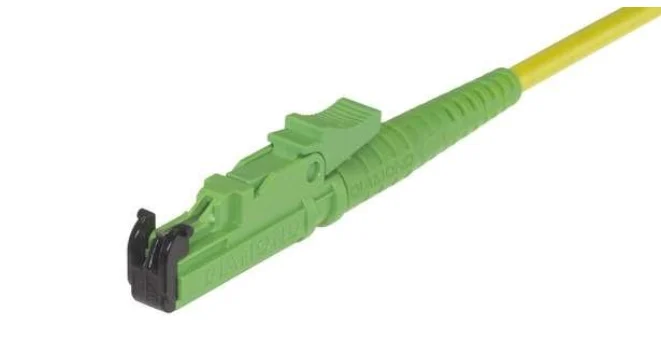
1. What Is an E2000 Connector?
The E2000 is a small-form-factor single-fiber connector featuring a push-pull connection mechanism with an integrated dust protection shutter.
- Appearance:
The E2000 connector looks similar to an LC connector, with a compact square-shaped housing. - Core Features:
- Built-in spring-loaded dust shutter:
When the connector is not mated, the shutter automatically closes to prevent dust, oil, or other contaminants from reaching the ferrule end face. This self-closing shutter design is the key feature that differentiates it from LC and SC connectors. - Push-pull mechanism:
The connector can be inserted and removed simply by pressing the release latch, which makes handling easier—especially in high-density patch panels or optical distribution frames (ODFs). - Color coding:
- Blue: PC/UPC polished type, used for standard communication applications.
- Green: APC polished type (8° angled end face), designed for applications requiring ultra-low return loss, such as FTTH (Fiber to the Home) and CATV (Cable Television) networks.
- Built-in spring-loaded dust shutter:
2. Key Features and Advantages
- Excellent Dust Protection:
The built-in automatic shutter significantly reduces contamination-related optical failures, enhancing network reliability. - High-Density Compatibility:
Similar in size to the LC connector, E2000 is ideal for space-limited environments, allowing high port density in ODFs, transceivers, and switches. - Low Insertion and Return Loss:
Precision manufacturing ensures consistent optical performance, with typical insertion loss ≤0.2 dB and return loss ≥60 dB (APC). - User-Friendly Push-Pull Design:
Easy insertion and removal without rotation; prevents accidental disconnection or fiber damage in densely packed panels. - Laser Safety Protection:
The shutter also provides a physical barrier against laser radiation, reducing the risk of accidental eye exposure.
3. Main Application Scenarios
- FTTH (Fiber to the Home):
One of the most common applications. Many optical network terminals (ONTs) and optical line terminals (OLTs) from leading suppliers like Huawei use E2000/APC interfaces. The optical wall outlet in many homes may feature a green E2000/APC connector. - Data Centers:
Used for interconnection between servers, switches, and fiber patch panels, where high density and reliability are critical. - Telecommunication Networks:
Applied in access networks and metropolitan area networks (MANs) as patch or interconnect interfaces. - CATV Networks:
Due to its superior return loss performance, the APC-type E2000 is widely adopted in cable television systems to ensure signal quality.
4.Differences Between E2000 and Common Connectors Such as LC and SC
| Feature | E2000 | LC | SC |
|---|---|---|---|
| Dust Protection Design | Built-in automatic shutter | Requires external dust cap | Requires external dust cap |
| Operation Method | Push-pull type (with release button) | Latch type (similar to telephone plug) | Push-pull latch type |
| Size | Small (same as LC) | Small | Large |
| Typical Colors | Blue, Green | Blue, Beige, Green | Blue, Beige, Green |
| Main Advantages | High dust protection, high reliability, safety | High density, strong versatility | Good stability, easy operation |
In simple terms, the E2000 connector can be regarded as an “upgraded version of the LC connector with an automatic dust shutter.”
5. Handling and Maintenance Guidelines
- Cleaning:
Although the E2000 features a protective shutter, always inspect and clean the fiber end face before mating. The shutter protects the internal ferrule, but contamination can still occur during manufacturing or transport. - Alignment:
When connecting, ensure the connector is properly aligned with the adapter. Push gently until you hear a “click”, indicating that it is securely latched. - Unplugging:
Always press the release button before unplugging. Pulling the connector directly can damage the latch or fiber. - Polish Type Matching:
APC and UPC connectors are not interchangeable!- Green = APC (angled)
- Blue = UPC (flat)
Inserting an APC connector into a UPC adapter may damage the ferrule end face and degrade optical performance.